
Introduction
Ever wondered how routers know where to send your data when there's no dynamic routing protocol in place? That's where static routing comes in! Unlike dynamic routing, static routes are manually configured, making them simple yet powerful for small networks or backup paths.
In this guide, we'll break down static routing, how to configure it, and even explore floating static routes - a clever way to set up backup paths. Let's dive in!
What is Static Routing?
Static routing involves manually adding routes to a router's routing table. Since these routes don't adapt to network changes, they're called "non-adaptive routing."
Key Features:
- AD (Administrative Distance): Default is 1 (highly trusted)
- Metric: Often 0 (since no cost calculation is needed)
Basic Static Route Syntax:
ip route [Network ID] [Subnet Mask] [Next-Hop IP]Example:
ip route 192.168.10.0 255.255.255.0 12.1.1.2This tells the router: "To reach 192.168.10.0/24, send traffic to 12.1.1.2."
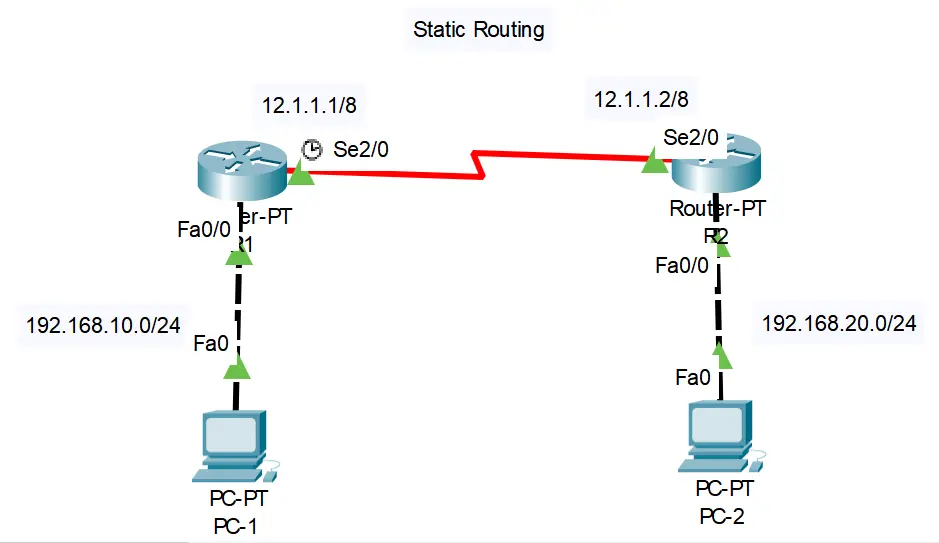
Network Topology Configuration
Network Topology
Router R1 Configuration:
interface Serial2/0
 ip address 12.1.1.1 255.0.0.0
 no shutdown

interface FastEthernet0/0
 ip address 192.168.10.1 255.255.255.0
 no shutdown

ip route 192.168.20.0 255.255.255.0 12.1.1.2 100
Router R2 Configuration:
interface Serial2/0
 ip address 12.1.1.2 255.0.0.0
 no shutdown

interface FastEthernet0/0
 ip address 192.168.20.1 255.255.255.0
 no shutdown

ip route 192.168.10.0 255.255.255.0 12.1.1.1
Floating Static Routes: The Backup Plan
What if your primary route fails? A floating static route acts as a backup by using a higher AD (less preferred).
How It Works:
Syntax:
ip route [Network ID] [Subnet Mask] [Next-Hop IP] [AD]Example:
ip route 192.168.10.0 255.255.255.0 12.1.1.2 100This route stays inactive unless the primary route goes down.
Real-World Example: Router Configurations
Let's look at the provided router outputs:
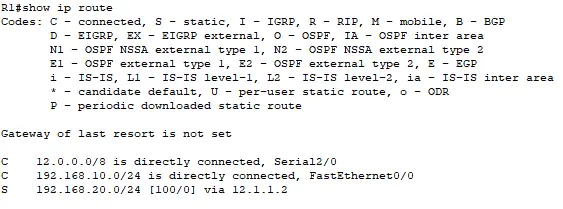
R1's Routing Table:
AD = 100 → This is a floating static route (backup)
Metric = 0 → No cost associated
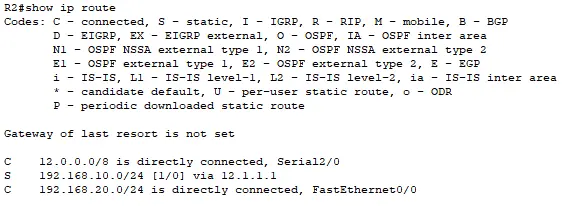
R2's Routing Table:
AD = 1 → Standard static route (primary)
Tips & Warnings
Best Practices
- Use static routes in small networks - they're simple but don't scale well
- Floating routes need a higher AD than dynamic routes (e.g., OSPF=110, so set AD=120)
Common Pitfalls
- Avoid typos in IPs/subnets! A wrong entry can break connectivity
- Remember that static routes don't adapt to network changes automatically
Conclusion
Static routing is a fundamental skill for network admins. Whether you're setting up a basic network or adding backup routes with floating static configurations, mastering this ensures reliability in your infrastructure.
Try it in a lab (like Packet Tracer) and see how it works!