
Introduction
Ever wondered how routers handle traffic when there's no specific route in the routing table? That's where default static routing comes in! It's a lifesaver for directing packets when no other path matches.
In this guide, we'll break down how default static routes work, how to configure them, and even set up a floating static route for backup. Let's dive in!
What is a Default Static Route?
A default static route is a special manually configured route that acts as a catch-all for traffic when no other route matches. Key points:
Key Features
- Represented as S* in the routing table
- Uses
0.0.0.0 0.0.0.0to match all networks and hosts - Default Administrative Distance (AD) is 1 (lower = more trusted)
- Acts as a gateway of last resort
Network Topology
Configuring Default Static Routes
There are two ways to set up a default static route:
Option 1: Using Next-Hop IP
ip route 0.0.0.0 0.0.0.0 12.1.1.212.1.1.2 is the next-hop router. Traffic with no matching route will go here.
Option 2: Using Exit Interface
ip route 0.0.0.0 0.0.0.0 Serial2/0Directs traffic out Serial2/0 instead of specifying an IP.
Verification
Check your routing table with:
show ip routeYou should see:
The [1/0] shows AD=1 and metric=0.
Floating Default Static Route (Backup Route)
What if your primary route fails? A floating default static route can act as a backup by using a higher AD.
How It Works
- 1. Primary route (e.g., OSPF) has lower AD (e.g., 110)
- 2. Backup default static route has higher AD (e.g., 100) and only activates if primary fails
Syntax:
ip route 0.0.0.0 0.0.0.0 12.1.1.2 100Verification
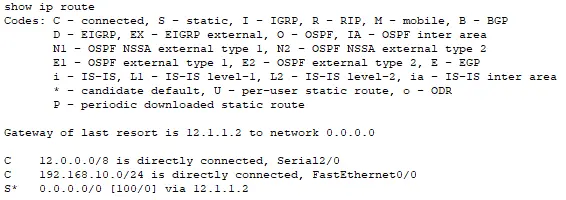
The [100/0] shows this is a backup route (AD=100).
Important Warning
- Avoid using default static routes in high-security networks - dynamic routing is safer
- Make sure your backup AD is higher than primary routes
- Test failover scenarios in lab environments first
Real-World Example: Router Configurations
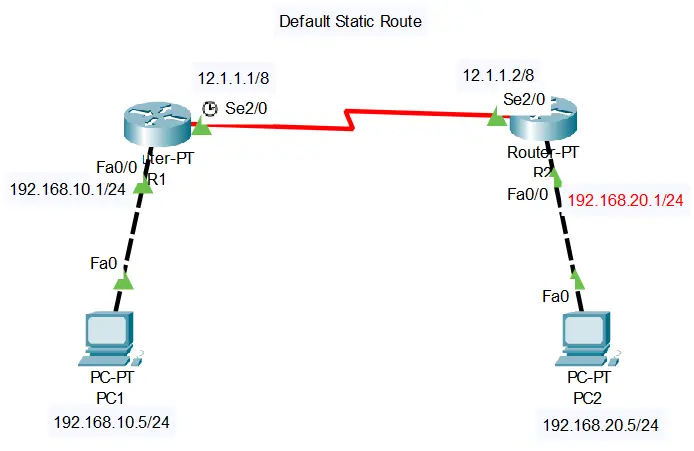
Let's look at the provided router outputs:
R1's Routing Table
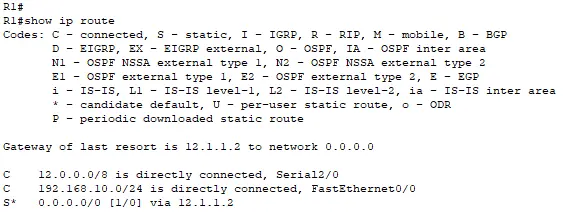
AD = 100 → This is a default floating static route (backup)
Metric = 0 → No cost associated
R2's Routing Table
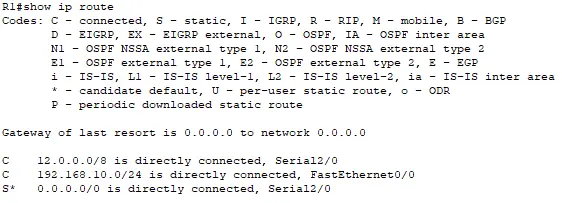
AD = 1 → Standard default static route (primary)
Exit Interface → Directs traffic to Serial2/0
Conclusion
Default static routes are simple yet powerful for managing unmatched traffic. Whether you're using a next-hop IP or exit interface, or even setting up a backup with a floating route, this guide should help you configure it with confidence.
Pro Tip: Always test your routes in a lab environment before deploying to production! Use tools like Packet Tracer or GNS3 for safe testing.