
Introduction to Route Redistribution
Redistribution is the process of importing routes learned by one routing protocol into another protocol. Different protocols like RIP and EIGRP don't communicate by default because they use different metrics for path selection.
Why Redistribution Matters
- RIP uses hop-count for path selection
- EIGRP uses bandwidth and delay for path selection
- Without proper metric conversion, routes won't be shared between protocols
Network Topology
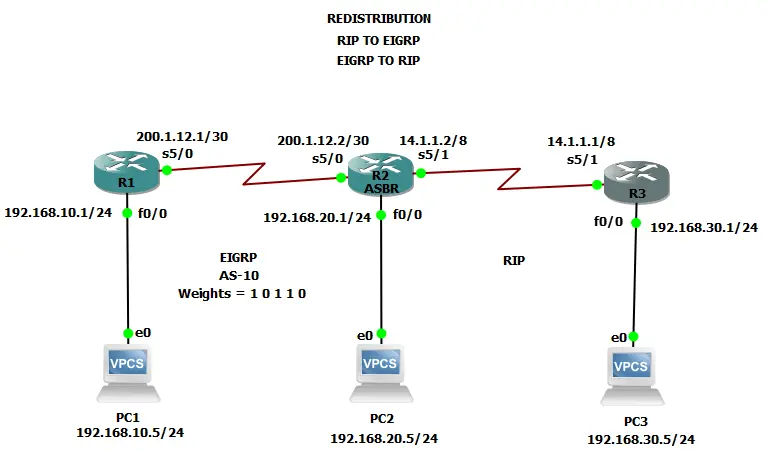
Network topology showing EIGRP and RIP redistribution
Network Details:
PC's
- PC1: 192.168.10.1/24
- PC2: 192.168.20.1/24
- PC3: 192.168.30.1/24
R1 (EIGRP Only)
- Fa0/0: 192.168.10.1/24
- S5/0: 200.1.12.1/30
- EIGRP AS 10
R2 (ASBR - EIGRP & RIP)
- Fa0/0: 192.168.20.1/24
- S5/0: 200.1.12.2/30
- S5/1: 14.1.1.2/8
- EIGRP AS 10 & RIP
R3 (RIP Only)
- Fa0/0: 192.168.30.1/24
- S5/1: 14.1.1.1/8
- RIP
PC Configurations:
PC1> ip 192.168.10.5 255.255.255.0 192.168.10.1
PC2> ip 192.168.20.5 255.255.255.0 192.168.20.1
PC3> ip 192.168.30.5 255.255.255.0 192.168.30.1
Router Configurations
R1 Configuration (EIGRP):
R1(config)# int f0/0
R1(config-if)# ip address 192.168.10.1 255.255.255.0
R1(config-if)# no shut
R1(config-if)# exit

R1(config)# int s5/0
R1(config-if)# ip address 200.1.12.1 255.255.255.252
R1(config-if)# no shut
R1(config-if)# exit

R1(config)# router eigrp 10
R1(config-router)# network 192.168.10.0
R1(config-router)# network 200.1.12.0 0.0.0.3
R1(config-router)# exit
R2 Configuration (ASBR):
R2(config)# int f0/0
R2(config-if)# ip address 192.168.20.1 255.255.255.0
R2(config-if)# no shut
R2(config-if)# exit

R2(config)# int s5/0
R2(config-if)# ip address 200.1.12.2 255.255.255.252
R2(config-if)# no shut
R2(config-if)# exit

R2(config)# int s5/1
R2(config-if)# ip address 14.1.1.2 255.0.0.0
R2(config-if)# no shut
R2(config-if)# exit

R2(config)# router eigrp 10
R2(config-router)# network 192.168.20.0
R2(config-router)# network 200.1.12.0 0.0.0.3
R2(config-router)# exit

R2(config)# router rip
R2(config-router)# network 14.0.0.0
R2(config-router)# exit
R3 Configuration (RIP):
R3(config)# int f0/0
R3(config-if)# ip address 192.168.30.1 255.255.255.0
R3(config-if)# no shut
R3(config-if)# exit

R3(config)# int s5/1
R3(config-if)# ip address 14.1.1.1 255.0.0.0
R3(config-if)# no shut
R3(config-if)# exit

R3(config)# router rip
R3(config-router)# network 192.168.30.0
R3(config-router)# network 14.0.0.0
R3(config-router)# exit
Configuring Redistribution
Redistribution is always configured on the ASBR (R2 in our topology) where both protocols meet.
EIGRP into RIP Redistribution:
R2(config)# router rip
R2(config-router)# redistribute eigrp 10 metric 5
R2(config-router)# exit
Metric 5: RIP only understands hop-count, so we assign an arbitrary hop count of 5 to redistributed EIGRP routes.
RIP into EIGRP Redistribution:
R2(config)# router eigrp 10
R2(config-router)# redistribute rip metric 1000 500 255 100 10
R2(config-router)# exit
Metric Components:
Bandwidth=1000, Delay=500, Reliability=255, Load=100, MTU=10
Verifying Redistribution
Routing Tables:
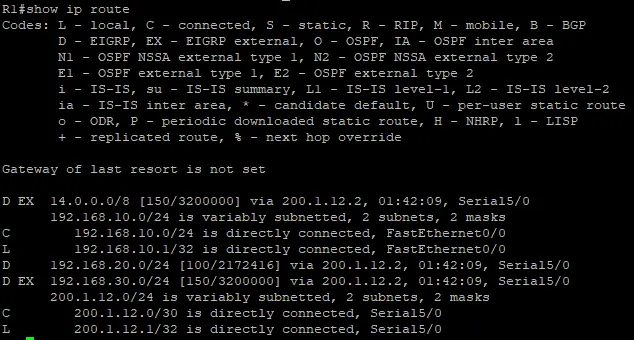
R1 Routing Table (EIGRP)
D EX 14.0.0.0/8 [150/3200000] via 200.1.12.2
D EX 192.168.30.0/24 [150/3200000] via 200.1.12.2
D 192.168.20.0/24 [100/2172416] via 200.1.12.2
D EX: External EIGRP route (redistributed from RIP)
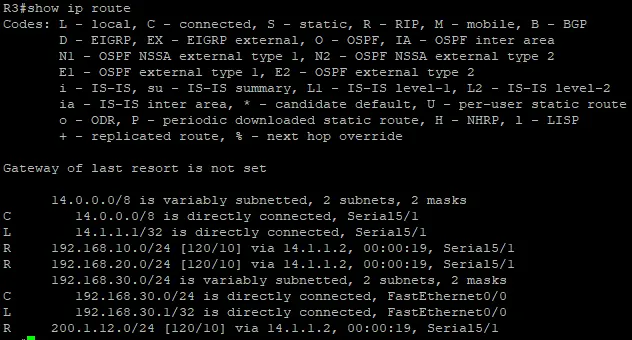
R3 Routing Table (RIP)
R 192.168.10.0/24 [120/10] via 14.1.1.2
R 192.168.20.0/24 [120/10] via 14.1.1.2
R 200.1.12.0/24 [120/10] via 14.1.1.2
R: RIP route (redistributed from EIGRP)
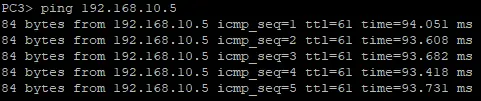
Connectivity Tests:
PC3 → PC1 (RIP to EIGRP)
PC3> ping 192.168.10.5
84 bytes from 192.168.10.5 icmp_seq=1 ttl=61 time=93.779 ms
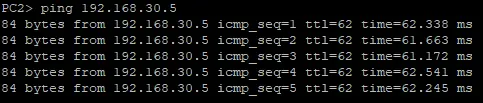
PC2 → PC3 (EIGRP to RIP)
PC2> ping 192.168.30.5
84 bytes from 192.168.30.5 icmp_seq=1 ttl=62 time=62.338 ms
EIGRP Metric Calculation
EIGRP uses a composite metric based on K values (weights) to calculate the best path:
Metric = 256 * [K1*B.W + K2*B.W + K3*delay] * [K5/(reliability+K4)]
Default K Values:
K1 = 1 (Bandwidth)
K2 = 0 (Load)
K3 = 1 (Delay)
K4 = 0 (Reliability)
K5 = 0 (MTU)
This simplifies to: 256 * (Bandwidth + Delay)
Changing K Values:
router eigrp [AS]
 metric weights [TOS] [K1] [K2] [K3] [K4] [K5]
 exit

Example:
router eigrp 10
 metric weights 0 1 0 1 1 0
 exit
Important Note
- All routers in the same EIGRP AS must have identical K values
- Mismatched K values will prevent neighbor relationships from forming
K Values Verification
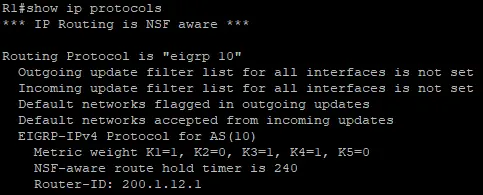
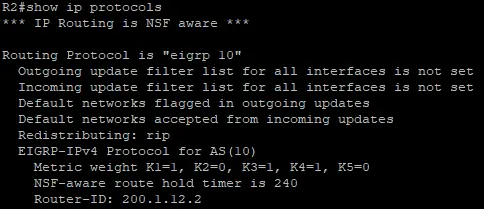
All EIGRP routers must have matching K values for neighbor relationships to form.
Checking K Values:
show ip protocolsR1 K Values
R2 K Values
Key Points About K Values:
- K1 and K3 are set to 1 by default (Bandwidth and Delay)
- K2, K4, and K5 are set to 0 by default
- All routers in the same EIGRP AS must have identical K values
- Mismatched K values will prevent neighbor relationships
Adjusting Administrative Distance
EIGRP allows changing AD values for both internal and external routes:
router eigrp [AS]
 distance eigrp [internal-AD] [external-AD]
 exit

Example:
router eigrp 10
 distance eigrp 100 150
 exit
AD Values in Routing Table:

- Internal routes: AD 100 (default is 90)
- External routes: AD 150 (default is 170)
Conclusion
Redistribution between EIGRP and RIP requires careful attention to metric conversion and K value matching. By following these steps, you can successfully share routes between these protocols:
-
1Configure basic EIGRP and RIP on respective routers
-
2Set up redistribution on the ASBR with proper metrics
-
3Verify matching K values on all EIGRP routers
-
4Test connectivity and verify routing tables
Remember that redistribution is always configured on the ASBR where both protocols meet.