
Introduction to EIGRP
EIGRP (Enhanced Interior Gateway Routing Protocol) is a hybrid routing protocol that combines features of both link-state and distance-vector protocols. Originally designed for personal use, its popularity has made it an open-source protocol. Unlike traditional routing protocols, EIGRP does not rely on periodic updates; instead, it only sends updates when there are changes in the network topology.
Key Characteristics:
- Hybrid Protocol: Combines advantages of link-state and distance-vector protocols
- No Periodic Updates: Updates are triggered only by network changes
- KCP Count Limit: Default is 100, with a maximum limit of 255
EIGRP Tables
EIGRP maintains three primary tables to manage routing information:
1. Neighbor Table
- Tracks adjacent EIGRP routers
- Maintains state of neighbor relationships
- View with
show ip eigrp neighbors
2. Topology Table
- Stores all learned routes and their metrics
- Contains feasible successors
- View with
show ip eigrp topology
3. Routing Table
- Contains the best paths selected from the topology table
- Used for actual packet forwarding
- View with
show ip route eigrp
Path Selection in EIGRP
EIGRP selects the best path based on a composite metric value, calculated using the following formula:
Metric Value = (Bandwidth + Delay) × 256
Components of the Metric:
Bandwidth: Derived from the slowest link in the path (in Kbps)
Bandwidth = 10^7 / Bandwidth_minimumDelay: Sum of all delays along the path (in microseconds)
Delay = (Sum of Delays) / 10By default, EIGRP primarily considers Bandwidth and Delay, though it can also factor in Reliability and Load if configured.
Administrative Distance in EIGRP
Administrative Distance (AD) is a measure of a route's trustworthiness. In EIGRP:
Internal Routes
AD = 90 (routes originating within the EIGRP domain)
External Routes
AD = 170 (routes redistributed from other protocols)
Configuring EIGRP
EIGRP can be configured using two methods:
1. Classical Mode (Legacy)
Use Case: Suitable for small networks without advanced features
Syntax:
router eigrp [AS_number]Example:
router eigrp 100Network Addition:
For classful networks:
network [network_ID]Example:
network 192.168.10.0For classless networks (using wildcard mask):
network [network_ID] [wildcard_mask]Example:
network 200.1.12.0 0.0.0.32. Named Mode (Modern)
Use Case: Ideal for large, complex networks requiring advanced features
Syntax:
router eigrp [name]Example:
router eigrp mysigrpPractical Configuration Example
Network Topology
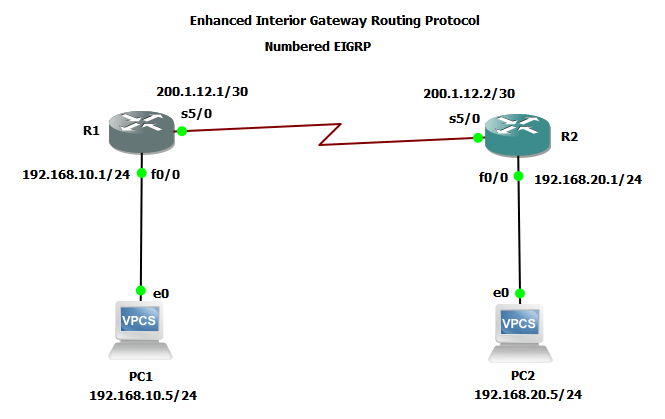
EIGRP topology with two routers and connected networks
R1 Configuration:
R1(config)# interface FastEthernet0/0
R1(config-if)# ip address 192.168.10.1 255.255.255.0
R1(config-if)# no shutdown
R1(config-if)# exit

R1(config)# interface Serial5/0
R1(config-if)# ip address 200.1.12.1 255.255.255.252
R1(config-if)# no shutdown
R1(config-if)# exit

R1(config)# router eigrp 100
R1(config-router)# network 192.168.10.0
R1(config-router)# network 200.1.12.0 0.0.0.3
R1(config-router)# exit
R2 Configuration:
R2(config)# interface FastEthernet0/0
R2(config-if)# ip address 192.168.20.1 255.255.255.0
R2(config-if)# no shutdown
R2(config-if)# exit

R2(config)# interface Serial5/0
R2(config-if)# ip address 200.1.12.2 255.255.255.252
R2(config-if)# no shutdown
R2(config-if)# exit

R2(config)# router eigrp 100
R2(config-router)# network 192.168.20.0
R2(config-router)# network 200.1.12.0 0.0.0.3
R2(config-router)# exit
Routing Tables:
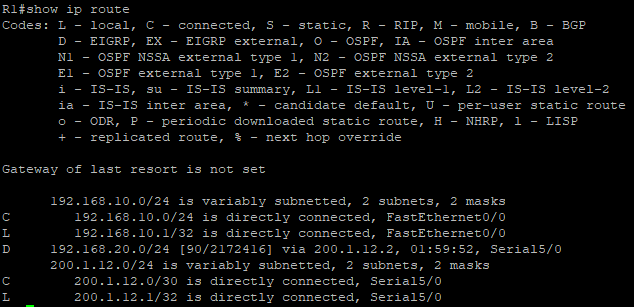
R1's routing table showing EIGRP-learned routes
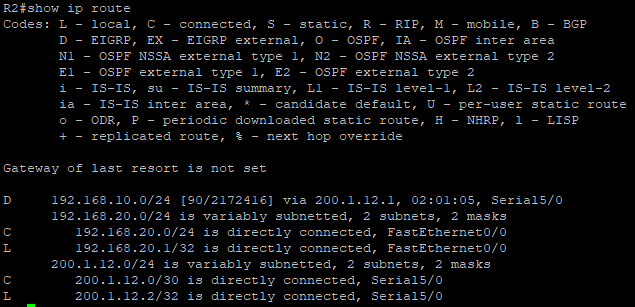
R2's routing table showing EIGRP-learned routes
Connectivity Verification:
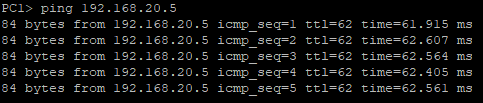
Successful ping from PC1 (192.168.10.5) to PC2 (192.168.20.5)
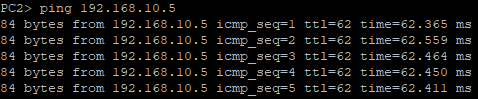
Successful ping from PC2 (192.168.20.5) to PC1 (192.168.10.5)
Commands: To View Different EIGRP Tables
# View Routing Table
show ip route

# View EIGRP Routes
show ip route eigrp

# View Topology Table
show ip eigrp topology

# View Neighbor Table
show ip eigrp neighbors
Path Manipulation in EIGRP
EIGRP allows administrators to influence path selection by adjusting Bandwidth and Delay on egress interfaces (interfaces forwarding traffic out of the router).
Key Concepts:
- Best Path: High bandwidth + low delay
- Backup Path: Low bandwidth + high delay
Configuration Example:
R1(config)# interface Serial5/0
R1(config-if)# bandwidth 1444
R1(config-if)# delay 50
R1(config-if)# exit
Interface Configuration Verification:
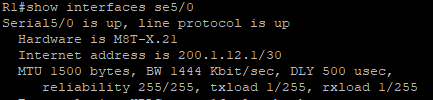
We can see BW 1444 Kbit/sec, DLY 500 usec are now changed by commandNote: The router multiplies the delay value by 10. For example, delay 50 equals 500 microseconds.
Conclusion
EIGRP is a powerful and flexible routing protocol suitable for modern networks. Its hybrid nature, efficient update mechanism, and advanced features like path manipulation make it a preferred choice for many network administrators.
By understanding its tables, metrics, and configuration methods, you can optimize EIGRP for your specific network requirements.