
Ever wondered how routers decide the best path for your data? Routing Information Protocol (RIP) is one of the oldest yet simplest ways routers share information about network paths. Whether you're studying for certifications or setting up a small network, understanding RIP - its versions, configurations, and quirks - is essential. In this guide, we'll break down RIP's basics, how to configure it, and tips to avoid common pitfalls.
What is RIP?
RIP (Routing Information Protocol) is a distance-vector routing protocol that helps routers find the shortest path based on hop count (the number of devices between source and destination).
Key Features:
- Uses hop count as its metric (max 15 hops)
- Default Administrative Distance (AD) is 120
- Sends updates every 30 seconds, which can be resource-intensive
- Works only for 15 hops maximum
Did You Know?
RIP's 15-hop limit prevents routing loops but also restricts its use in large networks!
RIPv1 vs. RIPv2 - Key Differences
RIP has two versions, and they're not fully compatible:
RIPv1
- Broadcast updates
- No subnet masks in updates
- No authentication
RIPv2
- Multicast updates
- Includes subnet masks
- Supports authentication
Syntax for Configuration:
router rip
network 192.168.10.0router rip
version 2
network 192.168.10.0Why This Matters:
RIPv2 is more efficient and secure, but if you're working with older devices, you might need to make RIPv1 and RIPv2 work together.
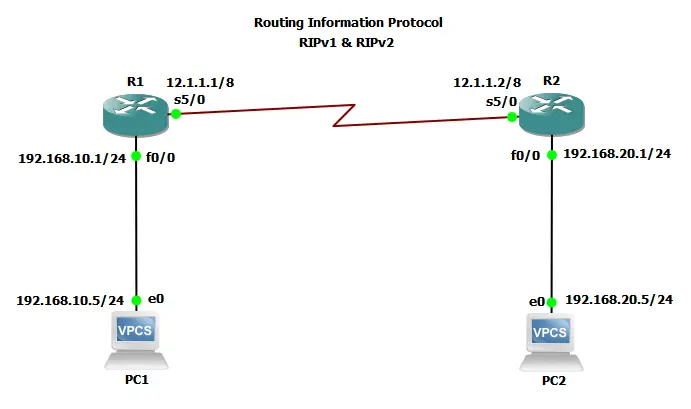
Network Topology Configuration
Network Topology
Router R1 Configuration:
interface Serial5/0
 ip address 12.1.1.1 255.0.0.0
 no shutdown

interface FastEthernet0/0
 ip address 192.168.10.1 255.255.255.0
 no shutdown

router rip
network 192.168.10.0
network 12.0.0.0
Router R2 Configuration:
interface Serial5/0
 ip address 12.1.1.2 255.0.0.0
 no shutdown

interface FastEthernet0/0
 ip address 192.168.20.1 255.255.255.0
 no shutdown

router rip
version 2
network 192.168.20.0 network 12.0.0.0
Making RIPv1 and RIPv2 Compatible
Since RIPv1 and RIPv2 don't play nice by default, you can tweak interfaces to bridge the gap:
-
1
Receive v2 updates on an interface:Interface Config
ip rip receive version 2 -
2
Send v2 updates from an interface:Interface Config
ip rip send version 2
Warning
Mixing versions can lead to incomplete routing tables if not configured carefully!
Changing RIP's Administrative Distance (AD)
By default, RIP's AD is 120, but you can increase or decrease it (e.g., to 50) to deprioritize RIP routes over other protocols:
router rip
distance 50
When to Use This:
If you're running multiple routing protocols (like OSPF or EIGRP), adjusting AD ensures RIP doesn't override better paths.
AD Value Modification Example

Example of changing RIP's Administrative Distance to 50 for specific routes.
Real-World Example: RIP in Action
R1's Routing Table
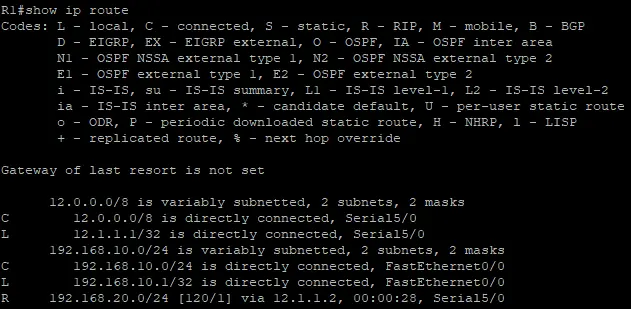
R1 knows about 192.168.20.0/24 via RIP ([120/1] = AD 120, 1 hop away).
R2's Routing Table
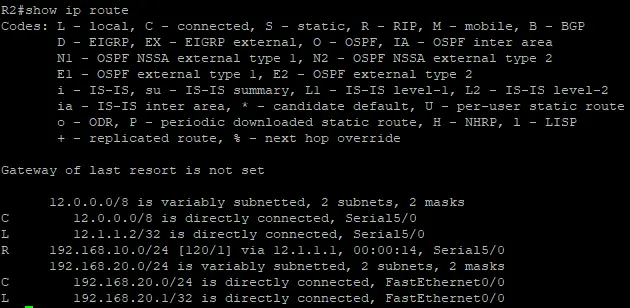
R2 learns 192.168.10.0/24 via RIP the same way.
PC1 to PC2 Ping Test
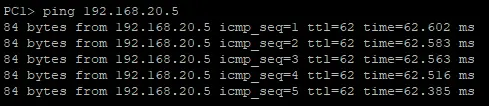
Successful ping from PC1 (192.168.10.5) to PC2 (192.168.20.5) showing RIP is working.
PC2 to PC1 Ping Test
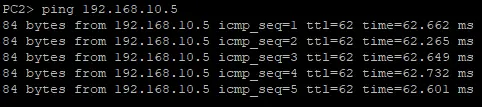
Successful ping from PC2 (192.168.20.5) to PC1 (192.168.10.5) confirming bidirectional communication.
This shows RIP dynamically sharing routes between routers - no manual static routes needed!
Conclusion
RIP is a great starting point for learning routing protocols, even if it's outdated for large networks. Try configuring it in a lab, experiment with versions, and see how routes propagate.
Got questions? Drop a comment below!