
Introduction
"Auth means if the correct user is guessing the device." This simple yet powerful statement encapsulates the essence of authentication in networking. In Enhanced Interior Gateway Routing Protocol (EIGRP), authentication serves as a critical security mechanism to verify the identity of neighboring routers before establishing adjacencies.
In classical EIGRP, there's only one authentication mode available - MD5. However, named EIGRP implementations offer multiple authentication options, providing greater flexibility for network administrators.
EIGRP Authentication Basics
Key Points About EIGRP Authentication:
- Purpose: Verifies router identity before forming neighbor relationships
- Classical EIGRP: Only supports MD5 authentication
- Named EIGRP: Supports multiple authentication modes
- Impact: Controls which routers can become neighbors and exchange routes
Important Note
Authentication must be configured consistently on both sides of any link where it's implemented. Mismatched configurations will prevent neighbor relationships from forming.
EIGRP Authentication Syntax
Syntax for EIGRP Authentication
The configuration process for EIGRP authentication involves two main steps:
key chain [name]
key [number]
key_string [password]ip authentication mode eigrp [AS] md5
ip authentication key-chain eigrp [AS] [key-name]Practical Configuration Example
Here's the exact configuration shown in the images for Router R2:
R2(config)# key chain blogship
R2(config-keychain)# key 10
R2(config-keychain-key)# key_string cisco123
R2(config)# int se5/1
R2(config-if)# ip authentication mode eigrp 10 md5
R2(config-if)# ip authentication keychain eigrp 10 blogship
This configuration creates a key chain named "blogship" with key ID 10 and password "cisco123", then applies MD5 authentication using this key chain to interface Serial5/1 for EIGRP AS 10.
Network Topology
Network Topology
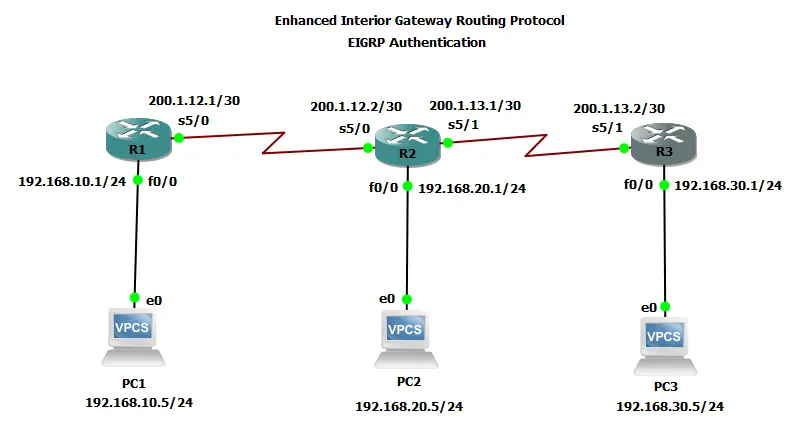
Network Summary:
- R1: 192.168.10.0/24 (Fa0/0), 200.1.12.1 (Se5/0)
- R2: 192.168.20.0/24 (Fa0/0), 200.1.12.2 (Se5/0), 200.1.13.1 (Se5/1)
- R3: 192.168.30.0/24 (Fa0/0), 200.1.13.2 (Se5/1)
- Links: 200.1.12.0/30 (R1-R2), 200.1.13.0/30 (R2-R3)
Complete Topology Configurations
PC's
PC1> ip 192.168.10.5 255.255.255.0 192.168.10.1
PC2> ip 192.168.20.5 255.255.255.0 192.168.20.1
PC3> ip 192.168.30.5 255.255.255.0 192.168.30.1
Routers
Router R1 (No Authentication)
hostname R1
!
interface FastEthernet0/0
 ip address 192.168.10.1 255.255.255.0
 no shutdown
!
interface Serial5/0
 ip address 200.1.12.1 255.255.255.252
 no shutdown
!
router eigrp 10
 network 192.168.10.0
 network 200.1.12.0 0.0.0.3
 no auto-summary
Router R2 (Authentication Configured)
hostname R2
!
key chain blogship
 key 10
 key-string cisco123
!
interface FastEthernet0/0
 ip address 192.168.20.1 255.255.255.0
 no shutdown
!
interface Serial5/0
 ip address 200.1.12.2 255.255.255.252
 no shutdown
!
interface Serial5/1
 ip address 200.1.13.1 255.255.255.252
 ip authentication mode eigrp 10 md5
 ip authentication key-chain eigrp 10 blogship
 no shutdown
!
router eigrp 10
 network 192.168.20.0
 network 200.1.12.0 0.0.0.3
 network 200.1.13.0 0.0.0.3
 no auto-summary
Router R3 (Authentication Configured)
hostname R3
!
interface FastEthernet0/0
 ip address 192.168.30.1 255.255.255.0
 no shutdown
!
interface Serial5/1
 ip address 200.1.13.2 255.255.255.252
 no shutdown
!
router eigrp 10
 network 192.168.30.0
 network 200.1.13.0 0.0.0.3
 no auto-summary
Configuration Notes
- R1-R2 link has no authentication (for comparison)
- R2 se5/1 link has MD5 authentication configured
- Now if R3 wants to make neighborship with R2 it needs to apply same auth on its interface
- Key chain name, key number, and password must match on both ends
- Authentication is applied per-interface in EIGRP
Before & After Authentication Analysis
Before Authentication Implementation
R2 Neighbor Table (Before):
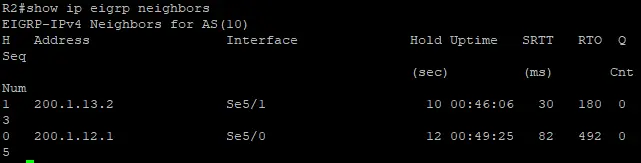
0 200.1.12.1 Se5/0 12 00:49:25 82 492 0 5
R2 has neighbors with both R1 (200.1.12.1) and R3 (200.1.13.2).
After Authentication Implementation
R2 Neighbor Table (After):

After authentication, R2 only shows R1 as a neighbor. The neighbor relationship with R3 was lost.
R3 Neighbor Table (After):

R3 shows no EIGRP neighbors after authentication was implemented.
Impact Analysis:
- R2 maintained its adjacency with R1 (200.1.12.1)
- R2 lost its adjacency with R3 (200.1.13.2)
- R3 shows no EIGRP neighbors after authentication
- R2 lost the route to 192.168.30.0/24 that was previously via R3
Troubleshooting Auth
- Verify neighbor relationships: Use
show ip eigrp neighborsto check which adjacencies are active - Check routing tables: Use
show ip routeto verify which routes are missing after authentication - Verify authentication configuration: Check that both sides of the link have matching configurations
- Check key chains: Ensure the same key ID and password are configured on both routers
Common Auth Issues
- Mismatched key chains or passwords
- Authentication not properly configured on both sides
- Different authentication modes configured on each router
- Key chain not applied to the correct interface
Conclusion
Proper implementation of EIGRP authentication is essential for securing routing protocol communications while maintaining necessary adjacencies. The configuration must be consistent on both sides of any link where authentication is implemented.
The before-and-after scenarios clearly demonstrate how authentication affects neighbor relationships and consequently, the routing tables in an EIGRP network. When configured correctly, EIGRP authentication provides an important layer of security without disrupting valid neighbor relationships.
Always test authentication configurations in a lab environment before deploying to production networks!